Every Xteink X3 & X4 firmware, plugin, and flashing method — in one place
The Xteink ecosystem moves fast and the names blur together. This is the
owner-friendly map: what each firmware is, who it is for, how to flash it,
and how to do it without bricking a locked device. Every repo, version, and
step below was checked against primary sources.
Risk is for a non-technical owner: web-flasher installs on unlocked devices are low-risk and revertible; "High" usually means experimental, single-maintainer, or dangerous on locked units.
The firmware, in depth
Benefits, the recommended install path, and the one caveat that matters for each.
CrossPoint Reader
v1.3.0 · ~5.2k★ · MIT
The main community firmware
X3 ✓X4 ✓Risk: Medium
Best for: Almost everyone. If you are not sure what to flash, flash this.
A real EPUB 2/3 engine: justification, hyphenation, footnotes, images, bookmarks, go-to-percent.
Wireless book transfer (web upload UI, WebDAV, OPDS, Calibre wireless) plus KOReader progress sync.
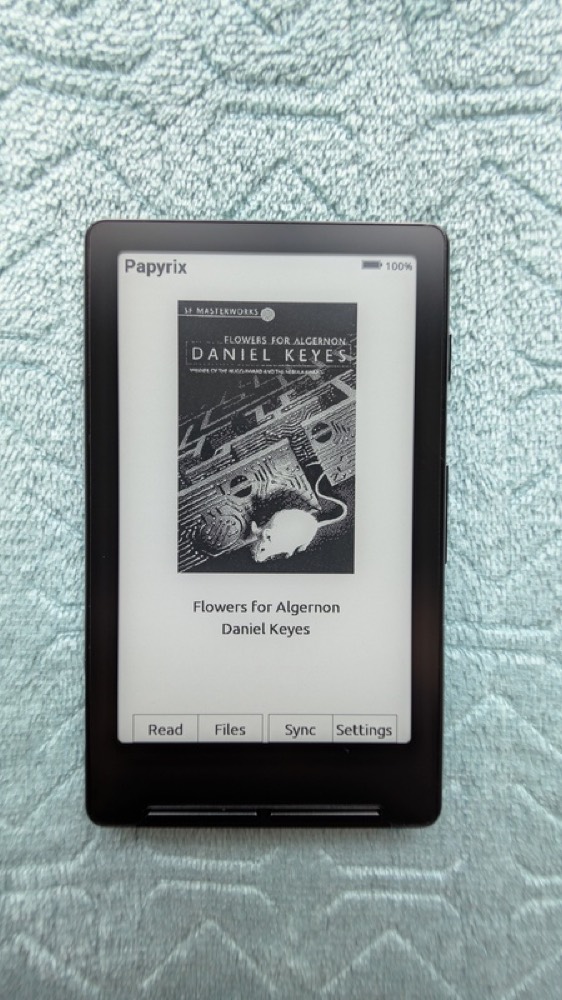
Papyrix on the device — book cover view with the Read / Files / Sync / Settings bar.
Install — papyrix-flasher (USB)
1Download papyrix-flasher for your OS and the latest firmware.bin from releases.
2Connect the device over USB (must be unlocked).
3Run: papyrix-flasher flash firmware.bin — it auto-detects, verifies (MD5), and reboots.
Heads-up: High risk: Papyrix has NO OTA. Flashing it on a USB-locked unit can leave no update or recovery path (see issue #120). Unlocked devices only.
CrossPet
v1.8.3 · MIT
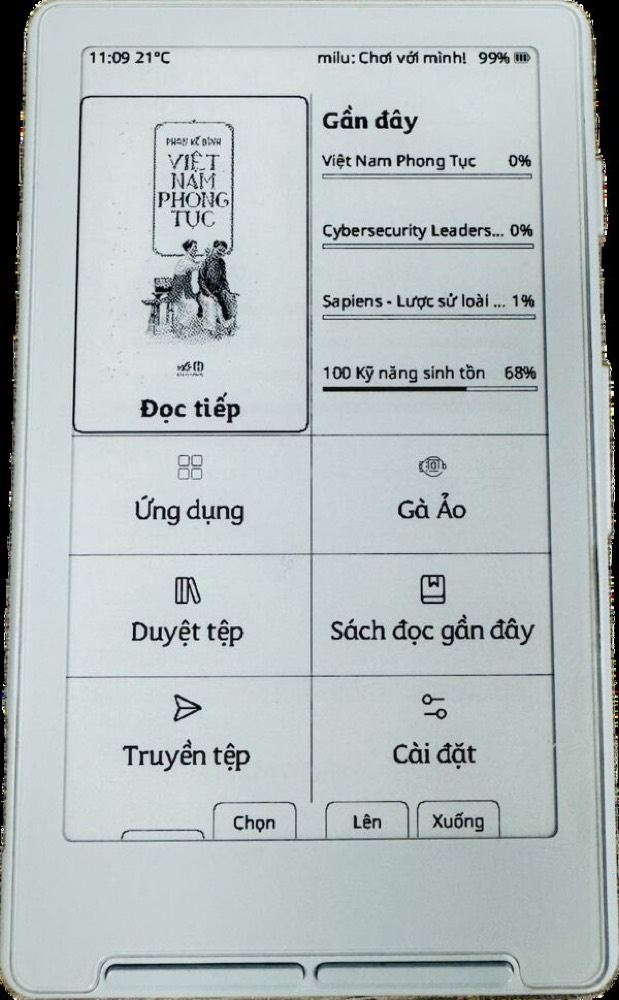
Gamified reading + Vietnamese
X3 ✓X4 ✓Risk: Medium
Best for: Readers who want a fun, feature-dense build — and the broadest Vietnamese support.
A Tamagotchi-style virtual chicken that grows as you read (~20 pages feeds it); streaks and stats.
Mini-games (chess vs. AI, Sudoku, 2048, Minesweeper), flashcards with spaced repetition, weather, Pomodoro.
Full Vietnamese localization with diacritic fonts; custom SD-card fonts.
Runs on X3 as well as X4, with KOReader sync and OTA.
2Connect the X4 by USB-C and note its serial port.
3Build & flash: pio run -t upload (then transfer books over Web Serial, Calibre, or CLI).
Heads-up: X4 only. Installing/updating the firmware needs PlatformIO + a cable — a higher barrier than the one-click forks. Dev-tagged, not a polished stable build.
AvesO3
v1.2.2 · MIT
For AO3 fanfiction readers
X3 ~X4 ✓Risk: High
Best for: Heavy Archive of Our Own readers with an unlocked X4.
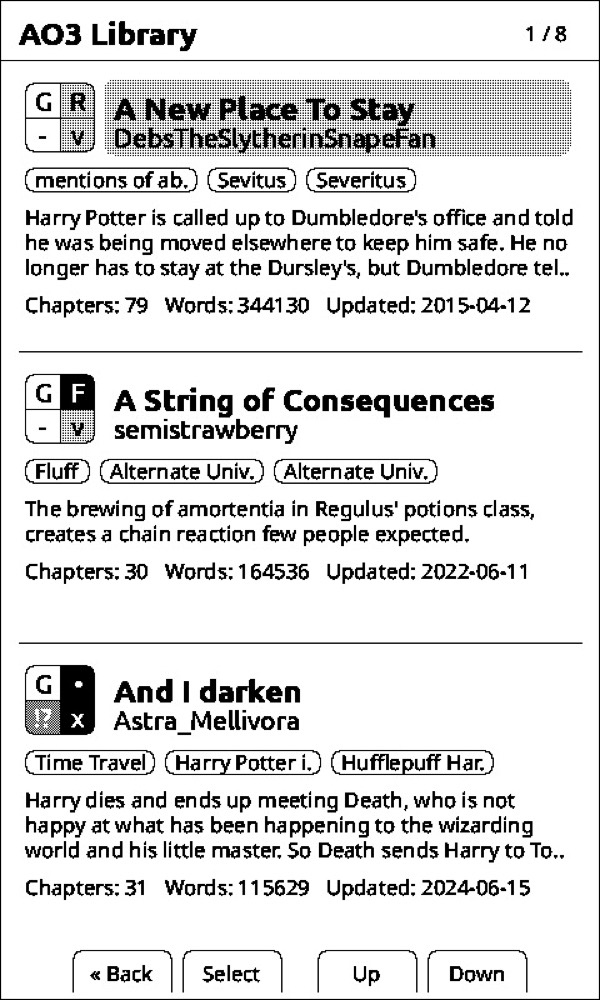
An AO3-styled library browser with per-fic status icons (unread / reading / waiting / new chapter / finished).
Checks AO3 for and downloads new chapters on-device over WiFi — no PC or sync tool needed.
Pin longfics to the homescreen so oneshots don’t bury them.
Built on CrossPoint’s reading engine, so the core reading experience is solid.
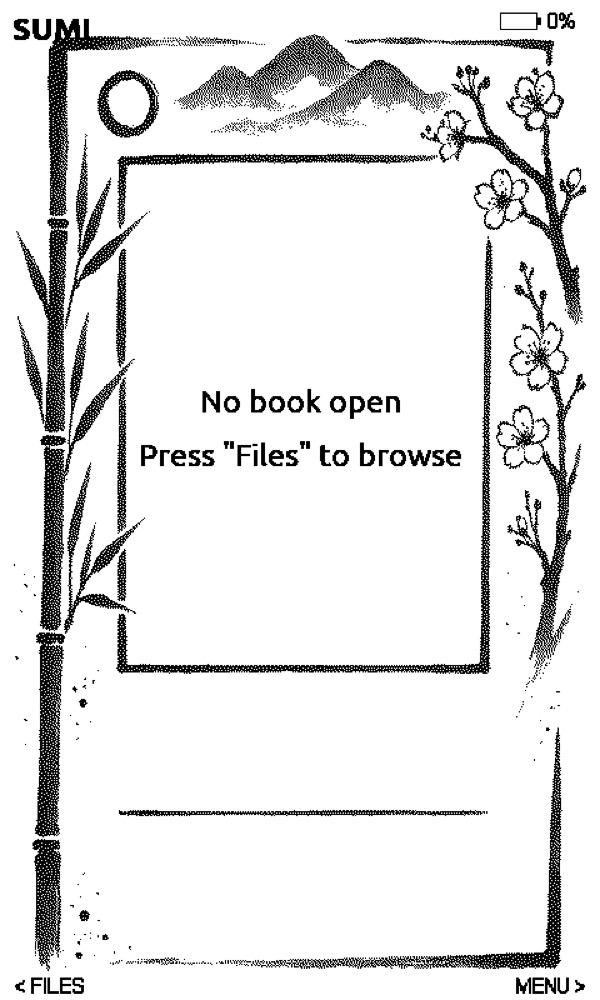
SUMI’s home screen — the signature sumi-e ink-art border, with Files and Menu controls.
Install — web flasher
1Connect an unlocked X3/X4 by USB-C in Chrome or Edge and wake it.
2Open sumi.page/flasher and pick your model.
3Flash, then reboot (Reset, hold Power 3–5s). Books and dictionaries go on the SD card.
Heads-up: Offline by design — there’s no WiFi transfer, so you’ll load books via SD card or the flasher’s file tools. A younger project than CrossPoint, but actively maintained.
Localization forks
CrossPoint forks that add non-Latin reading and native menus.
CrossPoint CJK · v0.3.4 · X4
Chinese / Japanese reading + UI with external CJK fonts and typography fixes. Simplified and Traditional builds. repo
CrossPoint KO · v1.3.0-ko · X3 + X4
Korean UI + full Hangul/Hanja rendering. Notably, it runs on the X3 as well as the X4 (the CJK build is X4-only). Actively maintained. repo
More reader forks worth knowing
Active CrossPoint/CrossInk forks with a clear niche.
inx · v1.0.14 · X4
A clean-reading CrossPoint fork: bookmarks, annotations, KOReader sync, native image rendering (JPEG/PNG/BMP), and a folder library with favorites. Flashes via xteink.dve.al. repo
CrumBLE · v4.2.1 · X4 (X3 WIP)
A CrossInk fork whose standout is real Bluetooth page-turner remote support, plus a Collections system, configurable bookshelf grid, and dictionary lookup. repo
Experimental & just-for-fun
Real, verified projects — but novelty or bleeding-edge. Treat as high-risk and X4-only unless noted.
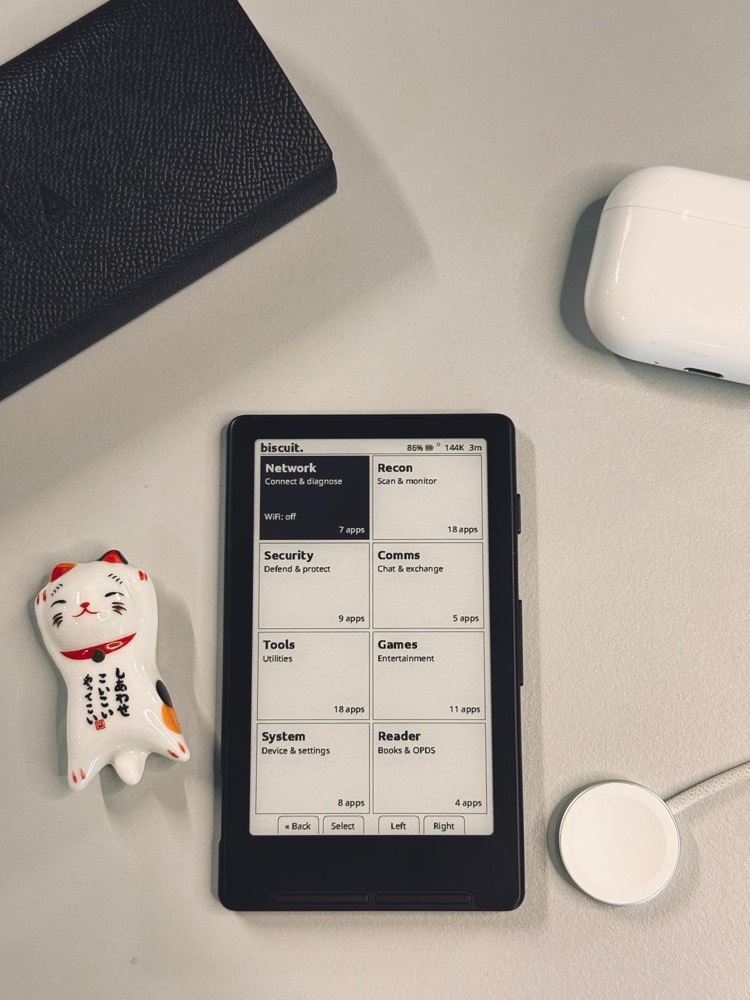
Biscuit turns the X4 into a tile-dashboard “pocket computer” — and still keeps the reader.
Biscuit — turns the X4 into a tile-dashboard "pocket computer" (tools, comms, games) that keeps the reader. v0.1.0 beta. repo
doom-xt4 — a DOOM-sprite raycaster (its own README admits it isn’t "real DOOM"). A fun demo, not a game. repo
PlusPoint — experiments with user-installable JavaScript apps: the closest thing to a real on-device plugin system. repo
cpr-vcodex — a CrossPoint fork that hardened the Lyra Carousel cover view and button-driven formatting (bold, bionic, dark mode). repo
TernOS — a from-scratch Rust OS (not a CrossPoint fork) that emulates PalmOS to run legacy apps. Reads books only after converting them to its own .trbk format. repo
TRMNL — vendor firmware that turns the X4 into an e-ink info dashboard (calendar/weather), replacing the reader. A different use entirely. flasher
How to flash: the five methods
Most forks share CrossPoint’s flash layout, so these methods apply across the
whole directory. Start with the web flasher unless a project says otherwise.
Before you start — pre-flight checklist
A desktop computer with Chrome or Edge (Firefox works too; Safari does not).
A USB-C DATA cable — charge-only cables silently fail.
The device awake, on its home screen — not asleep.
Confirmed unlocked — or read the locked-device brief below first.
~5 minutes (add ~25 min if you save a full-flash backup first).
Which path is mine?
1. Can the web flasher see your device? If yes, you’re unlocked → use the web flasher (method 1) and pick any firmware.
2. It can’t connect at all? Treat it as locked. Only CrossPoint & CrossInk are supported.
Locked + X3 → SD-card method or OTA Unlocker.
Locked + X4 → OTA Unlocker only. Never the X3 SD trick.
1 · Web flasher (WebSerial)
~5 minEasy
Easiest · revertible · the default
Unlocked X3/X4. Use desktop Chrome or Edge (Firefox also works); Safari is not supported — it has no WebSerial.
1Use a USB-C DATA cable (not charge-only) and wake the device — a sleeping reader never registers as a serial port. This is the #1 mistake new owners make.
2Open crosspointreader.com/#flash-tools (or xteink.dve.al) in Chrome/Edge.
3Pick your model and firmware, click flash, and select the device in the browser’s serial picker.
4When flashing finishes, press Reset, then hold Power 3–5s to boot. (A blank screen here usually just means it hasn’t been rebooted yet.)
5Tip: before flashing, open "Full flash controls → Save full flash" to back up (~25 min) so you can restore the exact prior state.
2 · esptool (command line)
~10 minTechnical
For technical users / custom builds
Unlocked devices, Python installed.
1pip install esptool
2Download firmware.bin from the project’s GitHub releases.
3Find the port (macOS /dev/cu.usbmodem… · Linux /dev/ttyACM0).
5Use address 0x10000 (the app) — never 0x0, which would overwrite the OEM bootloader.
3 · SD-card update
~5 minEasy
Works without a PC · rescues locked X3s
Any device whose firmware/bootloader supports SD update (added in CrossPoint 1.3.0). The locked-device rescue path for the X3 — but NOT the X4.
1Copy the SD build (update.bin) to the SD card root.
2Insert the card and plug in USB power.
3Trigger the bootloader flash with the button combo from the project’s docs — community guides use Power + Up (top-left button on the X3). Verify the combo for your firmware.
4The device detects update.bin and flashes from the card.
4 · OTA / OTA Unlocker
~10 minEasy
On-device updates · rescue for locked units
WiFi-connected devices. The Unlocker installs CrossPoint/CrossInk over the air on USB-locked X3 AND X4 units.
1Normal OTA: Settings → System → Check for updates pulls the latest GitHub release.
2Locked units: install the CrossPoint OTA Unlocker (macOS/Windows/Linux/RPi) from crosspointreader.com/unlocker.
3It runs a local hotspot that serves CrossPoint/CrossInk during the device’s update check.
4This does NOT re-enable USB flashing — only CrossPoint and CrossInk are supported this way.
5 · PlatformIO (build from source)
~30–45 minDeveloper
For developers and contributors
Anyone building/modifying firmware.
1git clone --recursive <repo>
2pio run --target upload (builds, flashes, and you can monitor serial logs).
3This is the required path for Microreader, and how every fork is built before release.
Plugins & customization
An honest note: CrossPoint itself has no on-device plugin store — and that is by design.
What people call "plugins" on CrossPoint is really a set of SD-card and desktop extensions (below). If you want
actual scriptable, installable plugins, two forks chase that: SUMI (Lua) and PlusPoint (JavaScript).
Custom fonts (.cpfont)
The real "plugin" layer for CrossPoint. 23+ prebuilt families (Literata, Merriweather, Atkinson Hyperlegible, IBM Plex…). Download over WiFi on-device, upload via the web UI, or copy to /.fonts/ on the SD card. Build your own from any TTF with the font builder.
Convert books to the device-native format for the fastest rendering and control over grayscale: bigbag/epub-to-xtc-converter (web + CLI) and CrazyCoder/cr2xt (desktop). For manga, comics, and PDFs, varo6/xtcjs adds dithering and spread-splitting.
The most genuine plugin system in the scene: SUMI firmware ships a Lua scripting framework for user-written extensions, alongside ~20 built-in apps and a dictionary. If you actually want “installable plugins”, this is it.
The other real plugin attempt: an experimental fork running user-installable JavaScript apps (via a tiny embedded JS engine). Bleeding-edge and not for daily use yet.
This is the part that actually bricks devices. Around April 2026 Xteink began
shipping some units with USB flashing disabled. Read this before touching a flasher.
Is my device locked?
There’s no reliable way to tell from the box — weak hints are an outer-box barcode
sticker or a plain brown package. The only sure test is to connect over USB and try to flash.
Units bought direct from xteink.com or Amazon are reported unlocked;
AliExpress and other grey-market imports are the ones that have shipped locked. Correlated, not guaranteed — re-verify at purchase time.
If it is locked
X3: two routes — the SD-card method (rename a build to update.bin, hold the left button + power) or the OTA Unlocker.
X4: the OTA Unlocker only — do not improvise the X3 SD trick on an X4, which can brick it.
Either way, only CrossPoint and CrossInk are supported on locked units.
The brick risk is real
Flashing unsupported firmware (e.g. Papyrix, which has no OTA) on a locked device can leave
no update or recovery path at all. On a locked unit you also lose the USB safety net,
so there is no clean rollback if an SD/OTA flash fails. Keep a known-good firmware.bin on the SD card.
Software lock or hardware fuse?
Unconfirmed. The working software workarounds (Unlocker, SD method) suggest the lock lives at the
stock-firmware/update layer rather than a permanent silicon eFuse — but no teardown has proven it.
Assume some risk and don’t treat "unlocked" as guaranteed reversible.
Golden rules: back up the full flash first (on unlocked units), use a USB-C data cable, wake the device before connecting, only flash CrossPoint/CrossInk on locked units, and never write esptool to 0x0 — use 0x10000.
How to go back (revert & recover)
Custom firmware is reversible on an unlocked device. From easiest to last-resort:
1Re-flash stock — the same web flasher offers the official Xteink firmware. Pick it and flash.
2Restore your backup — if you saved a full flash, “Write full flash from file” puts the device back exactly as it was.
3Swap boot partition — a quick rollback to the previous firmware at xteink.dve.al/debug.
4Bootloop? Press Reset, then hold Back + Power to reach the home screen. Crashy after a flash? Delete .crosspoint on the SD card.
The hard truth: on a locked unit you lose the USB safety net — unsupported firmware can leave no recovery path. That’s why locked units stick to CrossPoint/CrossInk.
X3 vs X4: what changes for flashing
Resolution differs — X3 is 528×792, X4 is 480×800. Pick the right model in the flasher, and size sleep-screen images to match.
Some firmware is X4-only — Microreader, AvesO3, Biscuit, doom-xt4, TernOS, TRMNL and the CJK build don’t run on the X3. CrossPoint, CrossInk, Papyrix, CrossPet, SUMI and KO cover both.
Tilt-to-turn is X3-only — the X3’s gyroscope can turn pages by tilting; the X4 has no equivalent.
Locked-device rescue differs — locked X3 can use the SD method or the Unlocker; a locked X4 must use the Unlocker, and the X3 SD trick will brick it.
Quick answers
The flasher doesn’t see my device.
Almost always: it’s asleep (wake it first), a charge-only cable (use a data cable), or the wrong browser (Chrome/Edge, or Firefox — not Safari). If it truly never connects, it’s likely locked.
Do I really need to flash twice?
Coming from stock firmware, yes — it’s common to flash once, reboot, and flash again before CrossPoint appears. Not a bug.
Will flashing erase my books / SD card?
Flashing writes the firmware, not your SD card. Your books stay on the card. Custom firmware does build its own cache folder (.crosspoint) on the SD.
Can I switch between forks later?
On an unlocked device, freely — just flash another build. On a locked device you’re limited to CrossPoint/CrossInk and should not flash anything else.
Does this void my warranty?
Xteink officially restricts custom firmware and says it can void warranty and risk hardware damage. Flash at your own risk; buying direct keeps you unlocked and supported.
What’s the safest first move?
Flash CrossPoint via the web flasher on an unlocked device, after saving a full-flash backup. It’s revertible and the best-supported path.
"I have this problem" → the fix
The specific community complaints behind this page, and the firmware that solves each.
The problem
What fixes it
Firmware
Stock firmware feels basic / clunky
Flash CrossPoint — it is the whole reason the scene exists.
Sources include each project’s GitHub repo, README, and releases, plus crosspointreader.com and community flashing guides, verified June 15, 2026.
Device screenshots are from each project’s own repository or project site, used to show the firmware running. PocketInk is
independent and not affiliated with Xteink. Firmware names and versions change quickly — check the linked repos for the latest.